Split Fee Now Connects to JobAdder
Split Fee now connects to JobAdder. If your agency runs its desk there, you can pick candidates and vacancies out of JobAdder and put them in front of the Split Fee network without typing any of them twice. It is live now on every Split Fee plan.
Two ways to move a record
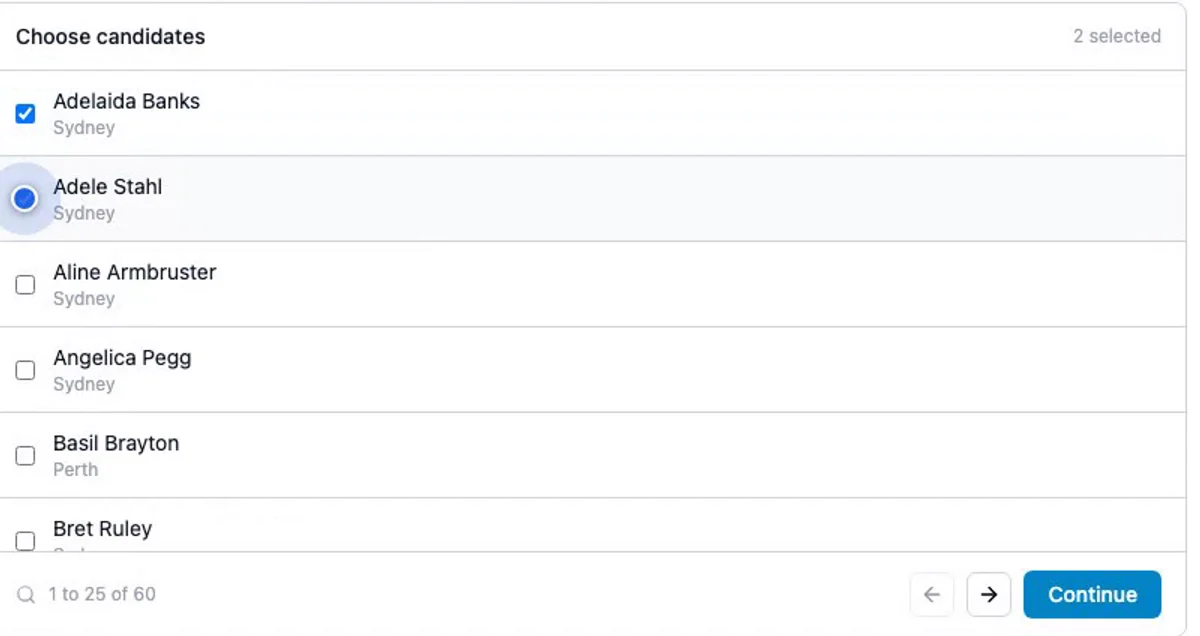
The first is a picker inside Split Fee. Open the importer and it lists your JobAdder candidates or jobs, 25 to a page, most recently updated first. Tick what you want to share, up to 50 in a run, and the import brings them across. Duplicates are skipped rather than overwriting what you already have, and if one record in fifty fails to fetch, the other forty-nine still arrive.
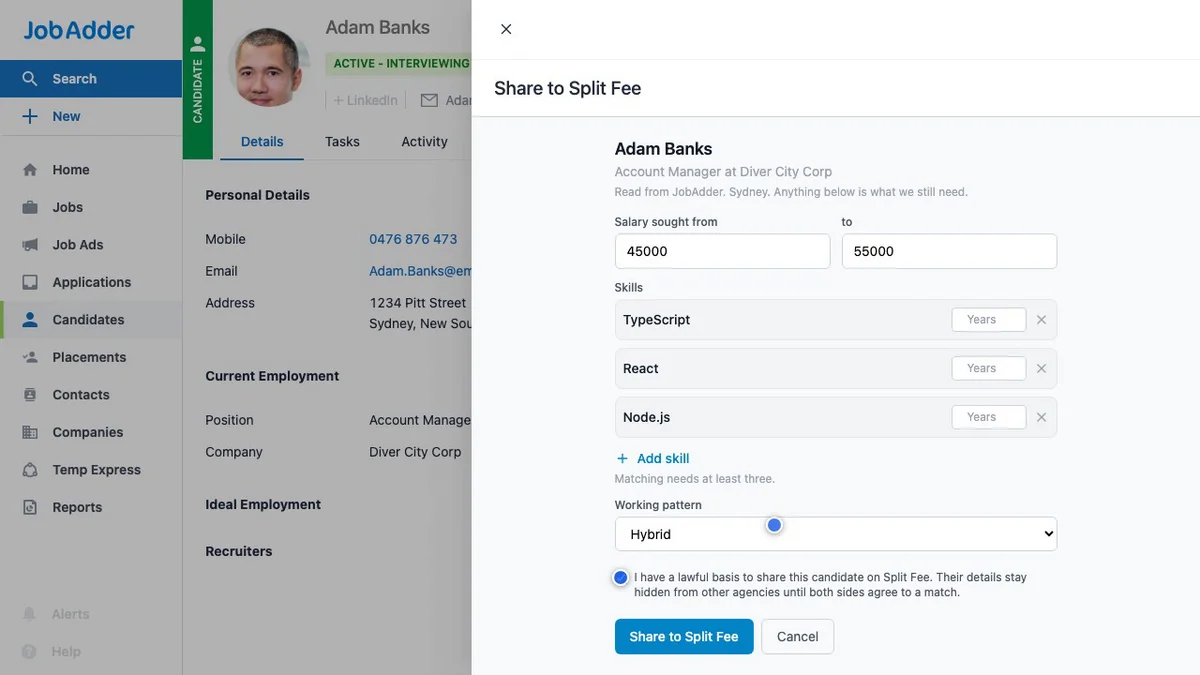
The second way never leaves JobAdder. Connecting adds a Share to Split Fee action to the candidate and job records in your own account. Open a record, click the action, confirm, and that one record crosses. Split Fee then marks the action complete in JobAdder, so your grid shows what has already been shared.
What it will not do
The restraint is deliberate. There is no background sync and no bulk copy; nothing crosses that you did not pick. Nothing in your JobAdder is edited either. The one write we make is ticking off the status of the Share to Split Fee action we added, and the code refuses any other write outright, so this is enforced rather than promised.
Connecting is just as contained. A JobAdder admin on your own account approves it once over OAuth, no password is ever shared with Split Fee, and the six scopes we request are deliberately narrow rather than JobAdder’s blanket read and write. The tokens we hold are encrypted at rest. If you disconnect, we remove our buttons from your JobAdder account first, then discard the tokens, and anything you already imported stays yours to keep or delete.
Three questions, asked once
Matching needs a few things JobAdder has no field for:
- a remote policy, which JobAdder has no equivalent for at all
- what a candidate expects to earn
- the skills a vacancy calls for
Rather than interrogate you record by record, the importer asks once per batch, and your answers fill only what a record is actually missing. A candidate who already has a city keeps it.
Vacancies arrive as drafts
One thing to know before your first run. Candidates go into matching straight away. Vacancies do not: they land as drafts, and each one needs a client attached before it is published and matched. Add the client, save, and it goes live. It is a single step, but you will meet it on day one, so better to expect it.
Privacy, briefly
Candidate imports ask you to confirm a lawful basis before they run, because a candidate is a person whose data you are sharing onward. A vacancy is a role you already hold the client relationship for, so those imports skip that step. What other agencies see is a non-identifying profile; names and contact details are released only once both agencies have signed the placement.
Switching it on
Updated October 2026. The integration is now on every plan, with nothing to switch on: head to Candidates or Vacancies, open Import, and connect. On the Free plan your first import of candidates and your first of vacancies are included, and sharing a single record from inside JobAdder is always free. Pro imports as often as you like.
Already on Split Fee? Connect and run your first import today. The integration page has the finer detail, and Chloë, the in-app support assistant, can answer questions about the importer as you go. If you are not on Split Fee yet: we are the platform where UK recruitment agencies share candidates and vacancies and split the fee when they place together. Signup is open to UK agencies, so create your account and connect your JobAdder from there.
JobAdder is a trademark of its owner. Split Fee built this integration through JobAdder’s partner programme.
What to read next
- Why manual split fee processes fail: the spreadsheet-and-handshake way of running splits, and where it comes apart.
- How to share candidates between agencies under GDPR: a proper unpacking of the lawful basis question the importer asks you.
- All integrations: everything that connects to Split Fee, in one place.